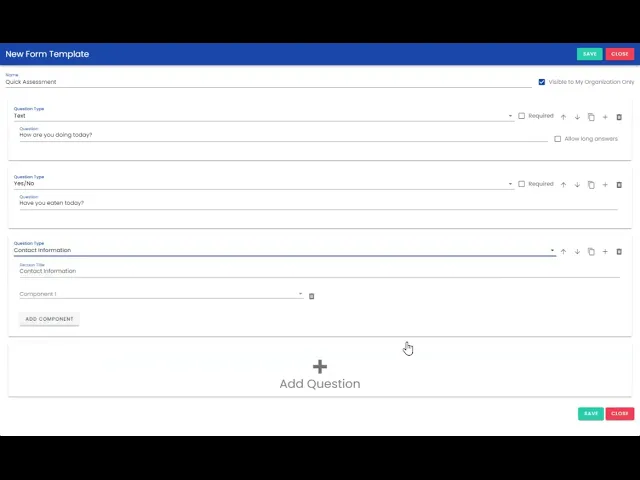
New Updates! Create your own Forms
Standardize, streamline and observe information about your community members by creating your own customized questionnaires!
Published:
Last update:
Category
Organization Admins
Standardize, streamline and observe information about your community members by creating your own customized questionnaires!
1. Log into your company profile
2. Select the Forms tab under Org Info
3. Add a new form
4. Give this form a Name
5. Mark if this is a form you only want your organization to see
6. Select + Add Question to start building
7. Select the question type (hover over the tool tip for in-depth definitions)
Note - When selecting the **Contact Information** question type, these will feed as a two way street to the contact information from the community member's profile. Answers you provide in the form will show in the community member's profile, and vice versa.
8. Note if the question is required
9. Drag, delete or duplicate (options are on the far right of each question card)
10. Save your form and users at your organization will be able to start completing it!
Note - Only organization admins can create questionnaires.
247 Cayuga Rd
Buffalo, NY 14224
We close the communication gaps by developing and reporting community and individual measures while also educating data owners regarding data literacy, technology accesibility, and financial stability.
Want to learn about how your organization can deliver better community care?
Website by Nervous Lemon